
Sound & Volume · Free · Optional Premium
Volume Lock Free
Set your limits.
Keep your sound in place.
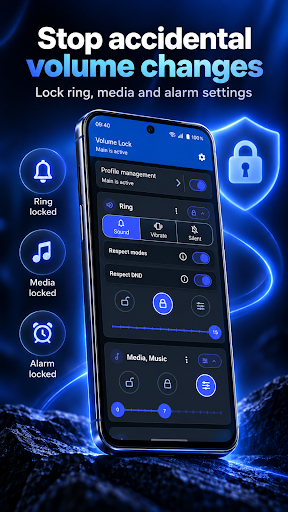
Set volume levels and limits for the channels your Android device supports. The free app is listed on Google Play as “Volume Lock”; Premium is optional.
Set a level or a range
Lock a supported volume channel or choose minimum and maximum limits.
Protect your settings
Use the app’s PIN controls to help prevent changes to your Volume Lock settings.
Work with your phone
Available channels and protection behavior depend on Android and your device.
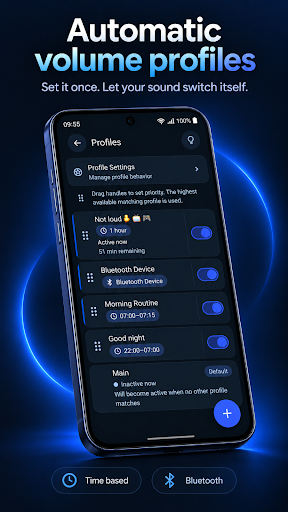
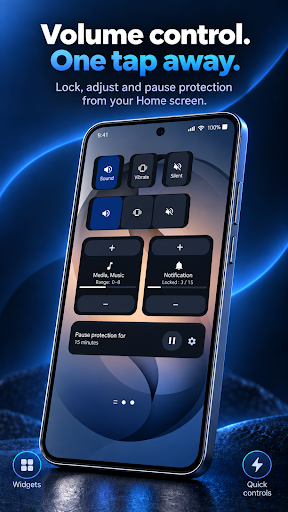
A look at the app.
Google Play listing previews, including promotional artwork and app screens. Your interface may vary with version, theme and device.
Questions, answered.
Does it control every sound on every phone?
No. Android and manufacturers can link or restrict volume channels. Review the channels the app detects and its setup guidance.
Is Premium the same as Pro?
No. Premium is an optional purchase inside Volume Lock Free. Volume Lock Pro is a separate paid app with its own Google Play purchase.
Does ad-free mean no analytics?
No. Firebase Analytics is present in Free and Pro. Advertising choices and the paid benefit are separate from analytics, purchase verification and licensing.
Help for Volume Lock Free.
Find setup guidance, purchase help and the documents for this app.